Quick Start
-
Create a new project
Terminal window dotnet new webapi -n AxisEndpoints.Tutorialcd AxisEndpoints.Tutorial -
Install the packages
Terminal window dotnet add package AxisEndpointsdotnet add package Scalar.AspNetCoreAxisEndpointsprovides endpoint discovery and mapping.Scalar.AspNetCoregives you a browser-based API reference so you can verify the endpoint immediately. -
Replace
Program.csUse the same minimal setup as
tests/AxisEndpoints.Tutorial/Program.cs:AddAxisEndpoints()scans the entry assembly and registers endpoint classes in DI.MapAxisEndpoints()then maps those endpoints into the Minimal API pipeline.using AxisEndpoints.Extensions;using Scalar.AspNetCore;var builder = WebApplication.CreateBuilder(args);builder.Services.AddOpenApi();builder.Services.AddAxisEndpoints();var app = builder.Build();app.MapOpenApi();app.MapAxisEndpoints();app.MapScalarApiReference();app.Run(); -
Add your first endpoint
Create
Features/Hello/HelloEndpoint.csand paste in the tutorial endpoint below.AxisEndpoints.Tutorial/|- Features/| \- Hello/| \- HelloEndpoint.cs\- Program.csusing AxisEndpoints;using System.Net;namespace AxisEndpoints.Tutorial.Features.Hello;public record HelloRequest{public required string Name { get; set; } = string.Empty;}public record HelloResponse{public required string Message { get; set; } = string.Empty;}public class HelloEndpoint(ILogger<HelloEndpoint> logger) : IEndpoint<HelloRequest, IResult>{public void Configure(IEndpointConfiguration config){config.Get("/hello").ProducesSuccess<HelloResponse>().ProducesError(HttpStatusCode.BadRequest).Summary("Hello").Description("This endpoint takes a name as input and returns a greeting message.");}public Task<IResult> HandleAsync(HelloRequest request,CancellationToken cancel){if (string.IsNullOrWhiteSpace(request.Name)){logger.LogWarning("Rejected request to /hello because the name was missing.");return Task.FromResult(Results.Problem(title: "Name is required",detail: "Provide a non-empty name query parameter.",statusCode: StatusCodes.Status400BadRequest));}logger.LogInformation("Received request to /hello with name: {Name}", request.Name);return Task.FromResult(Results.Json(new HelloResponse{Message = $"Hello, {request.Name}!"}));}}Because this is a
GETendpoint,HelloRequest.Nameis bound from the query string. A request to/hello?name=Alicewill populaterequest.NamewithAlice. -
Run the app
Terminal window dotnet run -
Verify the endpoint
Open the Scalar API reference at
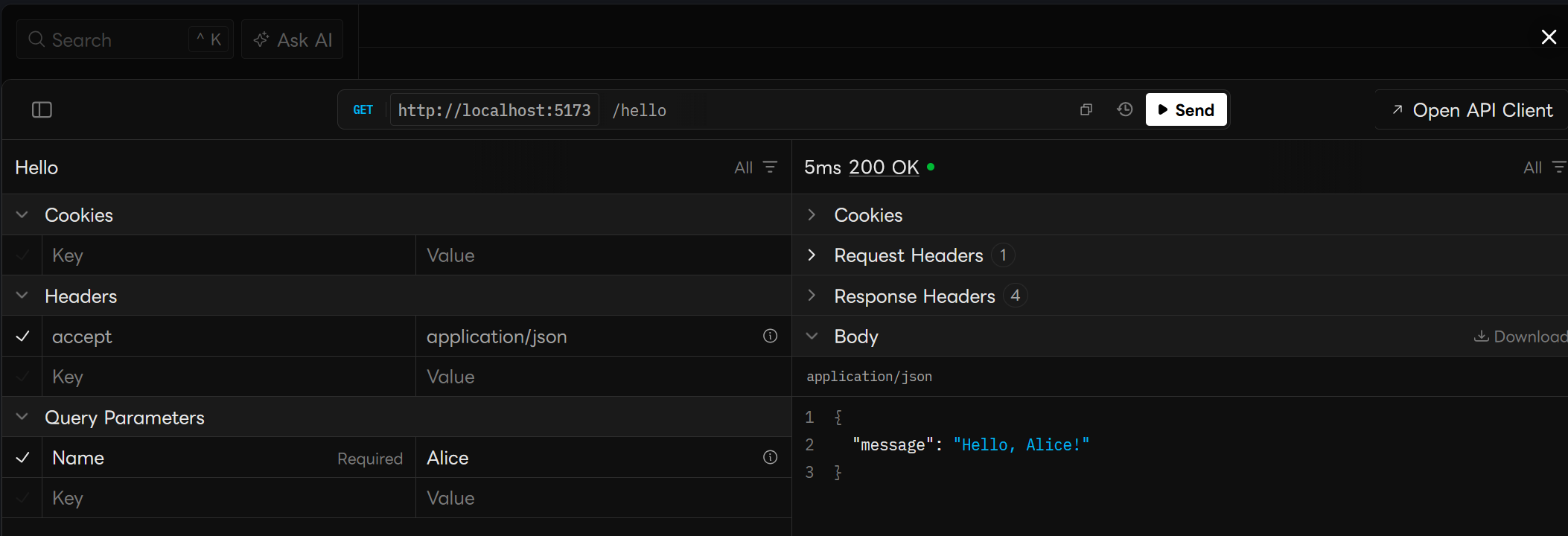
http://localhost:{port}/scalarand tryGET /hellowith anamequery parameter.You can also call the endpoint directly:
Terminal window curl "http://localhost:{port}/hello?name=Alice"The response should look like this:
{"message": "Hello, Alice!"}
What You Should See
Section titled “What You Should See”The tutorial project included in this repository uses the same setup and exposes the Scalar UI after startup.
For more details on endpoint structure and request binding, see Defining Endpoints and Request Binding.